
Equipment
CADI Advanced Imaging Software
Our top pick for dental imaging software: open integration with any PMS and hardware, server-based (no cloud subscription), and customized to your diagnostic workflow.
5.0 · 132 Google Reviews
Serving dentistry since 2003
Installation, training & expert support included
CADI 8 is our #1 recommendation for dental imaging software — and we optimize it for your practice. Open for integration: CADI makes integration with any practice-management system and hardware a priority, so you keep the freedom to use any systems without compromising workflow. Server-based: CADI's architecture keeps your data off the cloud and saves thousands in ongoing subscription fees. Advanced customization: display, workflow shortcuts, and imaging filters are all highly customizable — our team optimizes CADI for your unique workflows. CADI works with the widest range of imaging on the market: any digital X-ray system (from phosphor plates to the wireless DC-Air™ sensor), any intraoral or digital camera, and any panoramic/CBCT system. It keeps all the raw data from the sensor and uses a powerful 16-bit viewer with a unique Windowing tool, so you can interpret different grayscale representations of that data and eliminate everything that doesn't contribute to diagnostics.
- Open integration with any PMS and hardware
- Server-based — no cloud subscription fees
- Works with any X-ray, camera, panoramic, or CBCT
- 16-bit viewer with Windowing for medical-grade grayscale control
- Custom filters tuned to your diagnosticians
- Installation, integration, training & expert support
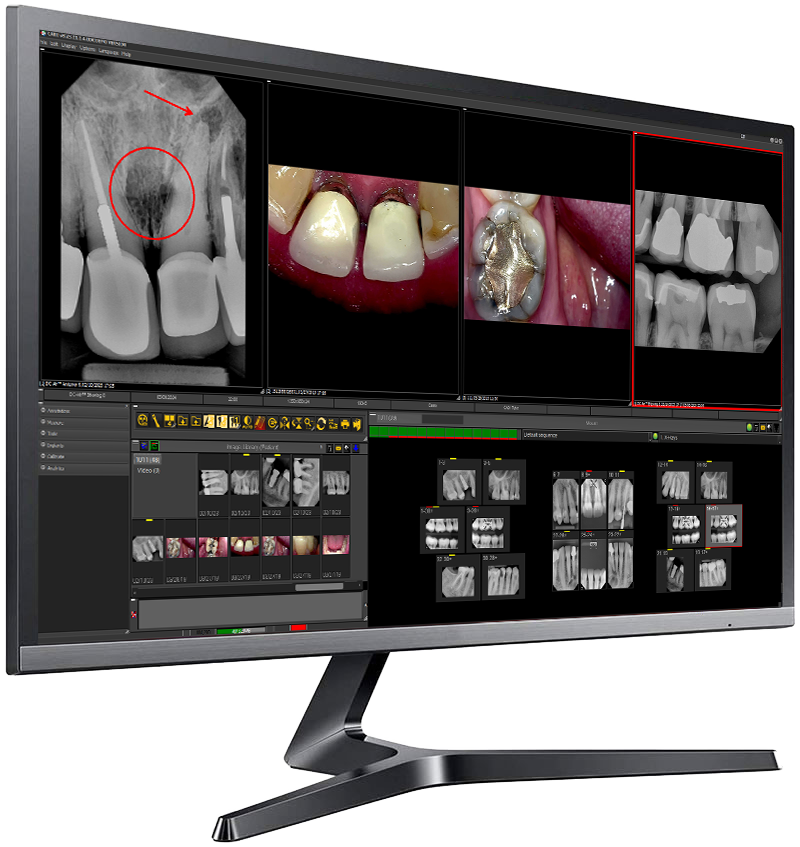
See it in action
CADI Advanced Imaging Software on video
Add or search a patient with CADI DATA
3:13CADI screen layout
2:21CADI basic functions
3:52More walkthroughs and training clips in thevideo library.
CADI Advanced Imaging Software questions, answered
How much does CADI imaging software cost?
CADI is licensed per practice: a primary license covers your first workstation, additional user licenses cover the rest, and annual support and updates (required) keep it current. Call Dental TI at 800-672-5733 for current pricing — financing is available.
Does CADI imaging software require a subscription?
CADI is server-based, so your data stays off the cloud and you avoid cloud hosting fees. It does require annual support and updates, which keep the software current and supported.
Does CADI work with my practice management system and imaging hardware?
Yes. CADI makes open integration with any practice-management system and hardware a priority, and it works with any digital X-ray system (from phosphor plates to the wireless DC-Air™ sensor), any intraoral or digital camera, and any panoramic or CBCT system.
What makes CADI's image viewer different?
CADI keeps all the raw data from the sensor and uses a 16-bit viewer with a unique Windowing tool, so you can interpret different grayscale representations of that data and eliminate everything that doesn't contribute to diagnostics.
Why does Dental TI recommend CADI as its top imaging software?
CADI 8 is Dental TI's #1 recommendation because its display, workflow shortcuts, and imaging filters are highly customizable, and Dental TI's team optimizes CADI for your practice's unique diagnostic workflows.
What is included when I buy CADI from Dental TI?
Every CADI purchase from Dental TI includes installation and configuration, integration with your practice's systems, remote team training (on-site available), and expert remote and on-site support. Dental TI has served dentistry since 2003 from Carmel, Indiana.
Considering cadi advanced imaging software?
Get an honest recommendation for your practice — including whether you need it at all.