
How to Tell if a New Dental X-Ray Sensor Will Work With Your Imaging Software
· Dental TI
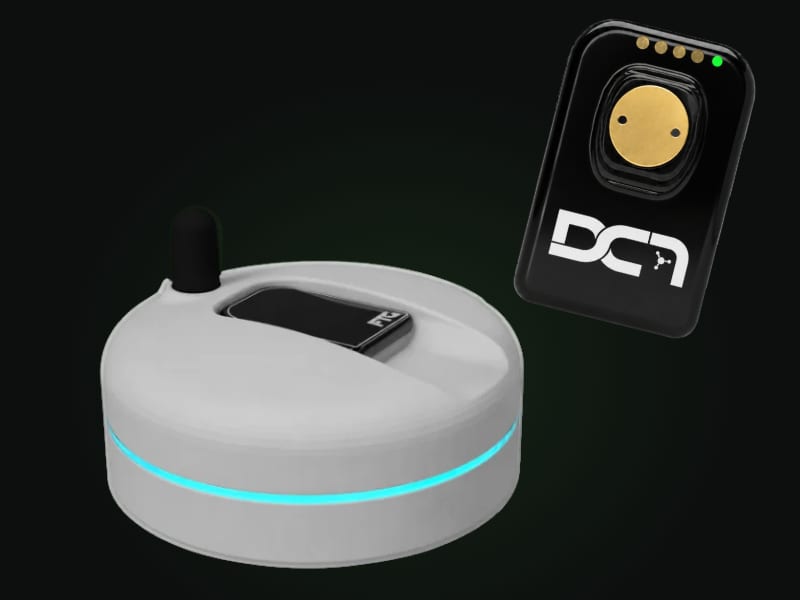
A new intraoral X-ray sensor will work with the imaging software you already run if the two share a connection path. There are three paths: direct integration, TWAIN, and a bridge to a second imaging program.
The path is worth knowing before you order. It decides how a full-mouth series moves from one image to the next, whether measurements are calibrated, which computers can capture, and who you call when an image doesn’t arrive.
How does a sensor get an image into your software?
Every sensor needs a piece of software that carries the image from the hardware into the patient’s chart. It comes in three forms.
Direct integration means the imaging software has built-in support for that specific sensor. Some vendors call it native support. Dentrix Ascend’s release notes, for example, separate directly integrated devices from TWAIN sources.
TWAIN is a public standard. The TWAIN Working Group, the not-for-profit that maintains it, describes its purpose as providing “a universal public standard which links applications and image acquisition devices.” Open Dental’s instructions show how that works in a dental office: you install the TWAIN driver the sensor manufacturer provides, then add the sensor as an imaging device.
A bridge hands capture to a second imaging program. Open Dental offers one as an alternative to adding a sensor directly, a Program Link to third-party software. Curve Dental lists certified bridges to other imaging software next to its certified sensors.
| Path | What it is | The question to ask |
|---|---|---|
| Direct integration | Your imaging software has built-in support for the sensor | Is my exact sensor model on your current supported list? |
| TWAIN | The sensor maker supplies a driver that your software calls | Does my edition accept a TWAIN source, and how does a series behave? |
| Bridge | A second imaging program does the capture | Where do the images live, and which program does my team open to read them? |
A compatibility chart can show that a path exists without saying which one you’ll get in your version, so that’s the first thing we’d ask a seller.
What changes when a sensor connects through TWAIN?
If the answer is TWAIN, four things are worth checking, because each imaging program handles a TWAIN source in its own way.
How a series advances. Open Dental’s advice for a sensor without its own setup page is to set the TWAIN software to single capture, so control returns to Open Dental after every image and it reopens the TWAIN window for the next one. Its device settings say a TWAIN radiograph sensor can still capture a series, with each image displayed before the next is acquired. Your software may handle the handoff differently, so we’d ask to watch a bitewing set and a full-mouth series in your own program before ordering anything.
Whether your edition accepts a TWAIN source. FTG’s DC-Air setup guide notes that some image management software needs additional modules or components before it can link with TWAIN applications. Your software vendor can tell you whether TWAIN capture is part of the edition you own. Driver details matter as well: Open Dental supports only 32-bit TWAIN drivers.
Measurement calibration. In Dentrix Ascend Imaging, the Measurement tool can be used without a calibration step on an image from a TWAIN source once that source’s pixel size is entered in the acquisition agent’s preferences. It’s the kind of setting an installer should handle and then show you working on a test image.
Who supports what. Open Dental’s troubleshooting advice is to test a TWAIN driver outside its software with a utility called Twacker. If the same error appears there, it says the problem lies with the device or its driver, and it points you to the manufacturer or an IT professional. That’s worth settling before you buy. We’d ask the seller who answers the phone when a capture fails, and whether they’ll work with your software vendor directly.
Why does a cloud system change the answer?
With a cloud practice-management system, capture still happens on a computer in the operatory. The questions shift to which computers capture and what operating system they run.
Dentrix Ascend Imaging acquires through an acquisition agent, a program whose icon sits in the Windows taskbar and whose preferences include a TWAIN tab. The TWAIN pixel-size setting in those same release notes is marked Windows only. Curve Dental publishes separate device lists for Windows and macOS, requires TWAIN drivers for every device it lists as not yet certified, and says TWAIN drivers aren’t compatible with macOS.
The sensor has its own requirements. FTG’s setup guide for DC-Air calls for Windows 10 Professional or newer on the acquisition PC, a USB port, and an internet connection during initial setup. If your operatories run Macs, that belongs in the first conversation with any sensor seller.
What should you confirm before you order?
FTG’s own site says compatibility depends on your software version and configuration. These are the details that settle it.
The exact software and version. We’d start by writing down the imaging program, its version, and the practice-management system if that’s separate. Dentrix and Dentrix Ascend are different products, so name the one you actually run.
The connection path. It’s worth putting the same question to the seller and to your software vendor: does this sensor connect by direct integration, TWAIN or a bridge in my version? The two answers should match.
The computers that capture. A list of the rooms where images are taken, and the operating system on each computer, answers most of what a seller needs. It’s also the moment to ask how the driver is licensed: per computer, per sensor or per site.
What your team sees during a series. The person who takes most of your radiographs is the best judge. Have them watch a series land in your mount and look at orientation, the order the images arrive in, and what happens after a retake.
Who installs, tests and supports it. You should know who installs the driver, who takes test images in each room, and who you call afterward.
What happens to the images you already have. If you keep your imaging software, the radiographs already stored in it stay where they are. The new sensor is a new capture source for the same program. Changing the imaging software itself is a separate project, and our guide to dental imaging software covers what to ask about conversion.
Where does DC-Air fit?
DC-Air is a wireless direct-conversion sensor, and we make the case for its diagnostic image accuracy in 4 Sensor Myths That Could Be Costing Your Practice. Its software path is TWAIN. The DC-Air TWAIN software runs on the capture computer and hands each image to the image management software you already use.
FTG describes DC-Air as TWAIN-compliant and compatible with many platforms, including Dentrix, Eaglesoft and Open Dental. The sensor’s FDA 510(k) summary says its TWAIN interface may also bridge images to other FDA-cleared imaging and practice-management software, and it names Dentrix Ascend Imaging, Apteryx XrayVision and DEXIS software. Our DC-Air page lists Open Dental, Dentrix, Dentrix Ascend, Eaglesoft, XDR, DEXIS, Apteryx and Curve.
On the hardware side, the sensor sends each image to its docking station over Bluetooth Low Energy, and the dock passes it to the computer over USB, according to the same FDA summary. FTG’s guide adds that the link doesn’t use your Wi-Fi network. The dock is the receiver, so it sits in the operatory, plugged into that room’s computer.
The complete kit includes a TWAIN license for one network with unlimited PCs. FTG’s guide says each sensor’s license and calibration files download to a computer the first time that sensor is used there, so plan on an internet connection during setup.
The same TWAIN window is where your team sets image orientation, chooses single or series capture, and finds Download Last Image, which retrieves the most recent capture from the sensor’s memory. Positioning is a separate subject, and our post on wireless positioning and retakes covers it.
Installation, imaging-software integration, remote team training and expert support are included with the kit. A sensor installation is normally done over a remote session. Before you order, we confirm your software, your rooms and the capture path, the same step the FDA summary describes for DC-Air’s US importer, whose technicians review a dentist’s hardware and software before a sale.
If you’d rather run one imaging program across every operatory, CADI Advanced Imaging is the suite we pair with DC-Air.
Three independent evaluations are worth reading before you take our word for any of this. Clinicians Report tested DC-Air in March 2022 and found its density sensitivity and spatial resolution among the highest it had tested. Dental Advisor’s six clinical evaluators used it 274 times and rated it 91%. Dental Product Shopper’s evaluators scored it 4.6 out of 5 and gave it a Best Product designation, and one evaluator reported that it integrated with the office’s software without trouble.
What does DC-Air cost, and which way to buy makes sense?
There are two ways to buy DC-Air. For most offices, we’d look at the plan first.
No Cord. No Worries.: $5,495 for the sensor kit, with a required 24-month plan at $99 a month per sensor. The plan payments come to $2,376, so the two-year commitment is $7,871 per sensor before sales tax and any claim charges.
Complete kit: $6,995, with no plan commitment and sales tax excluded.
Put side by side, the plan is $1,500 less on the day you buy and $876 more over two years. Here is what the $99 a month pays for:
- Protection against accidental loss and damage, from FTG. Those are the two worries we hear most from offices thinking about a sensor with no cord.
- WatchDog monitoring. A dashboard shows each sensor’s status, the room and workstation where it was last active, and battery, dock and connection alerts, along with reports on imaging activity. Our WatchDog walkthrough shows the screens. Last-known location helps your team find a missing sensor. It isn’t a guarantee against loss.
- IT support, customer service, maintenance and recalibration for the 24 months.
The deductible is the part to read closely. On kits ordered with the plan by December 2, 2026, your first approved replacement in the first year has a $0 deductible. After the first year, the deductible on a covered replacement is $850. The two-year manufacturer warranty and the plan do different jobs: the plan’s protection is for accidental loss and damage, which a warranty leaves out. Coverage follows FTG’s written terms, and we go through them with you before you enroll.
Any sensor that goes in and out of patients’ mouths all day can be damaged, with or without a cord. DC-Air does have fewer parts that fail. A wired sensor’s cable and connector take the most handling, and Clinicians Report expects DC-Air to last longer with both of them gone. A conventional scintillator sensor also stacks a scintillator and a glass fiber-optic plate on top of the detector. In our service experience the scintillator can delaminate inside the sensor, and the artifact shows up in the image. Direct conversion leaves both layers out, and Clinicians Report lists improved durability among its advantages. It’s still a piece of equipment your schedule depends on every day, which is why we’d cover it. Our post on the plan has more on what’s included.
Send us the name and version of your imaging software, your practice-management system, and the number of rooms that capture. We’ll tell you which path DC-Air takes in your setup, what your team will see after the exposure, and what each way of buying would cost for your number of sensors.
Get a DC-Air quote for your practice
Tell us about your rooms and imaging software. We'll confirm compatibility, compare the two kit options and include any eligible sensor trade-in in your quote.
Requesting a quote does not enroll you in a plan or commit you to a purchase.